14. Circular Positioning
Circular Positioning allows you to position a View relative to another using a radius and angle. In most cases, you won't be using this unless you have complex animations or transitions.
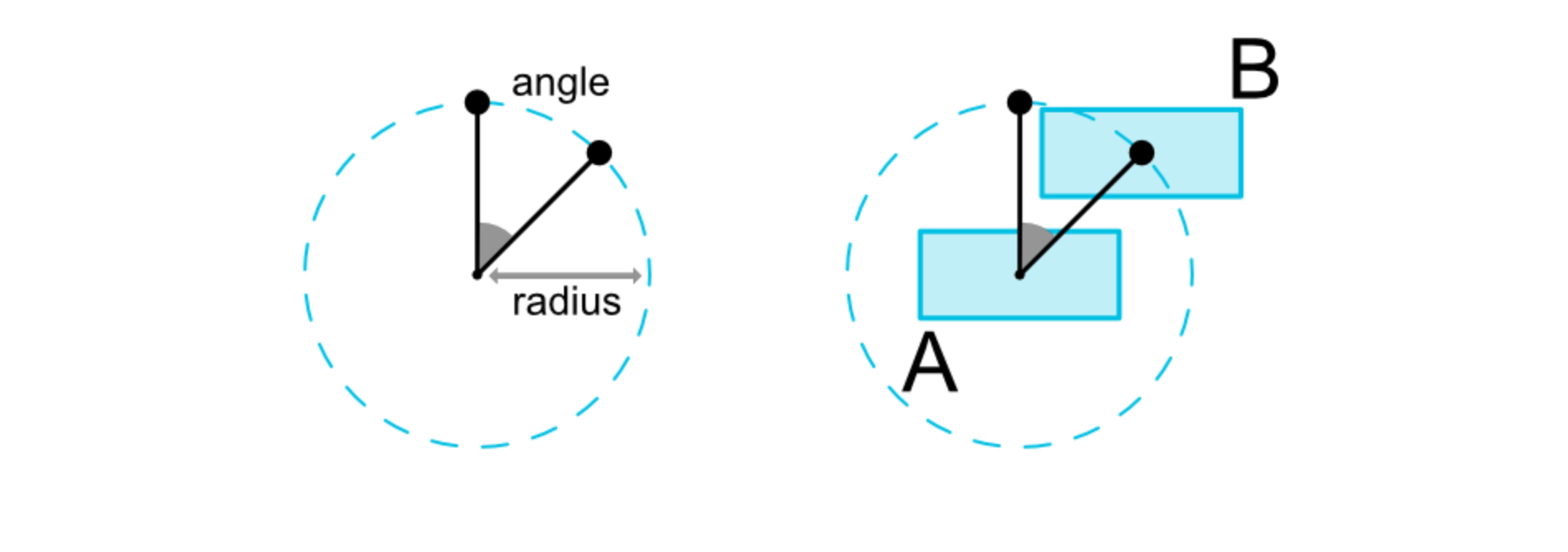
Circular Positioning
The above image would be represented in code with something like the following.
<button android:id="@+id/buttonA" ... />
<button android:id="@+id/buttonB" ...
  app:layout_constraintCircle="@+id/buttonA"
  app:layout_constraintCircleRadius="100dp"
  app:layout_constraintCircleAngle="45" />
It's important to note that the circular positioning constraints are derived from the center points of the individual Views, not their start or end points.